MICONNECT L1 -LESSON 15 – MiConnect Gateway S Model – Scheduler
MiConnect Scheduler (Overview)
MiConnect Scheduler — At a glance
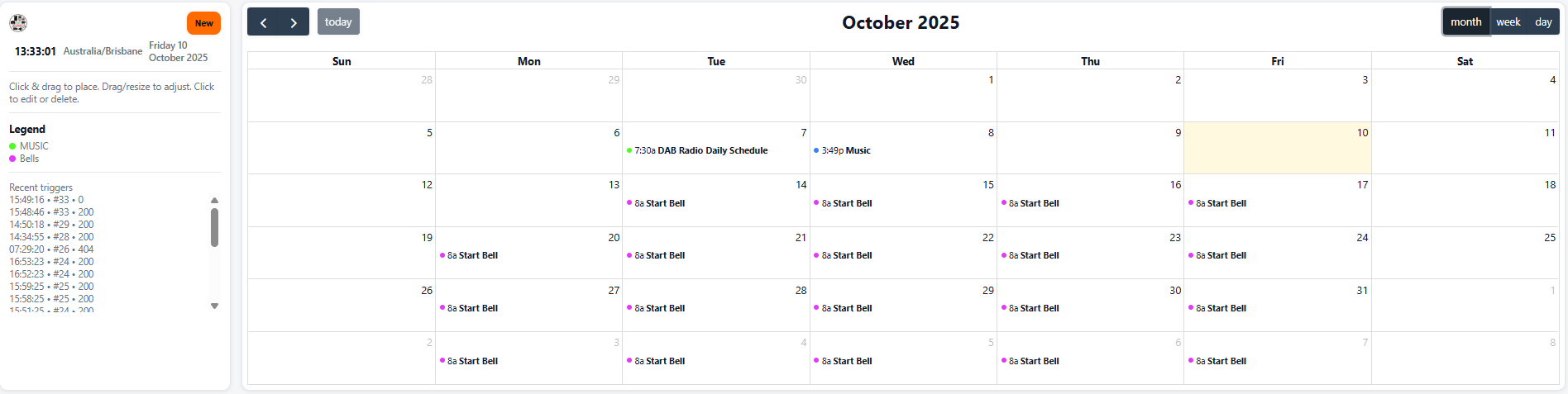
Powerful, browser-based scheduling for everything that happens on site — bells, playlists, radio, gates, relays and API-driven automations. It gives site staff a calendar they’ll actually enjoy using: familiar, fast and built specifically to control physical devices as well as media.
What it is
A PC-accessible, web UI scheduler that controls MiConnect devices and integrations. Create events that start/stop audio, trigger relays, call APIs, send SMS or change signage — with flexible recurrence rules and full editability from any modern PC.
What it can do
-
Schedule audio: bells, music playlists, and DAB radio stations (start/stop, volume ramping).
-
Trigger hardware actions: unlock/lock gates, toggle relays, arm/disarm outputs at scheduled times.
-
Fire custom integrations: call APIs/webhooks (for example: 07:00 →
POST /gate/unlock, 17:00 →POST /gate/lock). -
Infinite events & categories: create unlimited events, group by category (Bells, Admin, Sport, Emergency drills).
-
Rich recurrence rules: daily, weekly, business-days, custom day sets, monthly, yearly, and complex repeat rules.
-
Skip & block days: exclude school holidays, rostered maintenance days, or suspend whole blocks of dates.
-
Exceptions & overrides: skip individual occurrences, create single-instance edits, or temporarily disable repeating rules.
-
Import/export & sync: calendar import/export (ICS), plus replication across sites for consistent timetables.
-
Easy editing: drag-to-reschedule, bulk-edit, search/filter events and fast duplicate for repeating timetables.
-
Simulation & preview: check what will run before you push changes; preview next runs in human-readable form.
-
Auditing & rollback: event history, who edited what and when, with undo for recent changes.
-
Timezone & DST aware: reliable on Daylight Saving boundaries with local time handling and optional GPS/GSM fallback for isolated sites.
What sets it apart
-
Built for actions, not just appointments — scheduler understands devices, zones and hardware outcomes.
-
PC-first simplicity — looks and feels familiar (calendar UI like the big providers) but built to control physical site systems.
-
Extremely granular control — from one-off overrides to enterprise-scale replicated timetables across many sites.
-
Safety-conscious — preview, simulate and require role-based approvals for high-risk actions (eg: unlocking gates).
-
Resilient delivery — schedules persist locally and propagate reliably across the MiConnect network even through intermittent connectivity.
Why we developed it
Schools and sites needed a scheduling tool that did more than display appointments. They needed a calendar that directly interacts with site hardware and media with enterprise-grade repeatability, audit trails, and the simplicity non-technical staff expect. The Scheduler removes error-prone manual work and puts control back in the hands of site operators.
Metaphor
👉 The Scheduler is like the conductor’s score — it tells every player exactly when to start, stop, and change dynamics so the whole site performs perfectly together.
So What’s Next?????
We will do this as an exercise together so hold your boots on and we will come back to this…..
-
Create operator quick-start (weekly bell template + one-click import).
-
Add pre-built category packs (School day, Sport, After-hours, Emergency drill).
-
Design approval workflow for sensitive actions (unlock/door control).
-
Mobile-friendly views for on-the-go edits and emergency overrides.
-
Exportable timetables for compliance and parent communications.
Everything scheduled. Everything auditable. All from any PC.